How to Fix 'RuntimeError: Address already in use' in PyTorch Distributed on Linux
Quick Fix (TL;DR)
To clear the port collision immediately, kill the orphaned process holding the default master port:
# 1. Terminate any lingering process on default PyTorch distributed port 29500
sudo fuser -k 29500/tcp

# 2. Alternatively, launch torchrun with a dynamic ephemeral port
torchrun --nproc_per_node=4 --master_port=$(shuf -i 30000-60000 -n 1) train.py
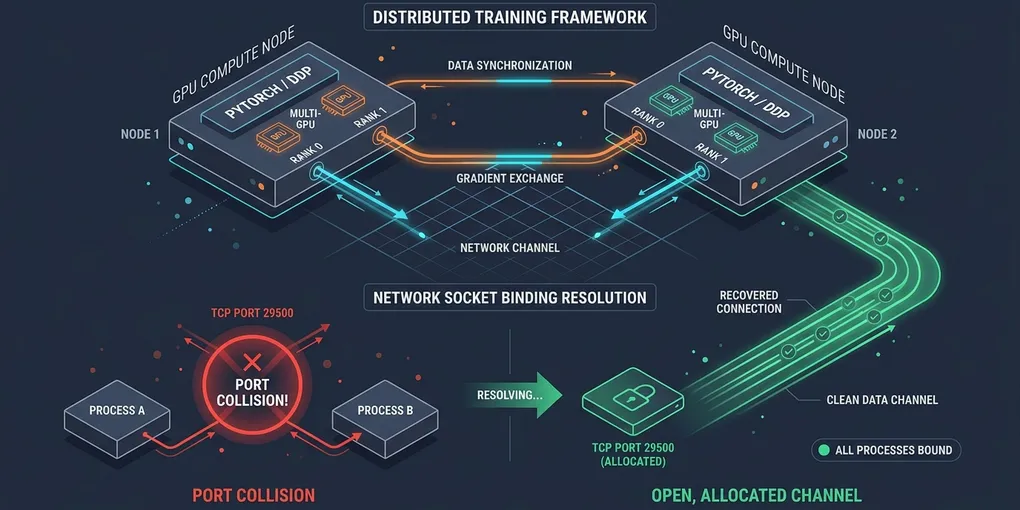
PyTorch’s c10d::TCPStore binds to port 29500 by default on rank 0 to coordinate distributed workers. When a previous training session aborts without a clean teardown, child worker processes remain alive in the background holding the socket open.
Root Cause Analysis
When launching multi-GPU training with torchrun, accelerate, or torch.distributed.launch, PyTorch initializes an inter-process coordination store called TCPStore. Rank 0 attempts to bind a listening TCP socket to 0.0.0.0:29500.
If the port is occupied, PyTorch halts with this failure:
[E socket.cpp:926] [c10d] The server socket has failed to bind on [0.0.0.0]:29500 (errno: 98 - Address already in use).
Traceback (most recent call last):
  File "train.py", line 42, in <module>
    dist.init_process_group(backend="nccl")
RuntimeError: Address already in use
This error stems from three primary operational scenarios on Linux:
- Orphaned Worker Processes (Zombies): If you interrupt training with
Ctrl+Cor a job manager kills the parenttorchrunprocess withSIGKILL, the child Python worker ranks do not receive termination signals. They remain running in the background, keeping the socket connection in anESTABLISHEDorCLOSE_WAITstate. - Concurrent Multi-Job Collisions: Two independent training runs or multiple developers executing on the same multi-GPU node default to master port 29500 simultaneously.
- Dual-Stack IPv4/IPv6 Binding Conflicts: In containerized Docker or Kubernetes environments,
localhostresolves to both127.0.0.1and::1. IfMASTER_ADDRis unset,TCPStoremay attempt dual binding and collide with itself.
| Scenario | Root Cause | Diagnosis Command | Recommended Fix |
|---|---|---|---|
| Aborted Previous Run | Orphaned rank 0 process still alive | ss -tulpn | grep 29500 |
Kill process via fuser -k 29500/tcp |
| Shared GPU Server | Another user running torchrun | lsof -i :29500 |
Use random --master_port |
| Container / K8s Pod | IPv4 vs IPv6 resolution conflict | ping -c 1 localhost |
Export MASTER_ADDR=127.0.0.1 |
Step-by-Step Resolution
Step 1: Identify the Process Holding Port 29500
Inspect active socket listeners on your Linux machine using ss or lsof:
# Using ss (iproute2)
ss -tulpn | grep 29500

# Expected output:
# tcp   LISTEN 0      128          0.0.0.0:29500      0.0.0.0:*    users:(("python",pid=84291,fd=7))
Or check with lsof:
sudo lsof -i :29500

# Expected output:
# COMMAND     PID    USER   FD   TYPE DEVICE SIZE/OFF NODE NAME
# python    84291 beomjin    7u  IPv4 928374      0t0  TCP *:29500 (LISTEN)
Note the PID (84291 in this example).
Step 2: Safely Terminate Zombie Worker Processes
Terminate the specific blocking process:
# Kill the single blocking PID
kill -9 84291
If multiple multi-GPU worker processes are desynchronized across different GPUs, kill all detached distributed Python workers at once:
# Terminate all orphaned distributed PyTorch workers safely
pkill -9 -f "torch.distributed"
pkill -9 -f "torchrun"
Verify that the port has been released:
ss -tulpn | grep 29500
# Output should be empty
Step 3: Configure Dynamic Ephemeral Ports in Production Scripts
Never hardcode port 29500 in automated scripts. In PyTorch 2.4 and newer, you can pass --master_port=0 to instruct the launcher to discover an open ephemeral port automatically:
# Native automatic port selection (PyTorch >= 2.4)
torchrun --nproc_per_node=4 --master_port=0 train.py
For older PyTorch releases, generate an open ephemeral port directly in bash or Python:
# Bash: Random high-range port allocation
MASTER_PORT=$(python3 -c 'import socket; s=socket.socket(); s.bind(("", 0)); print(s.getsockname()[1]); s.close()')
echo "Selected Master Port: $MASTER_PORT"

torchrun --nproc_per_node=4 --master_port=$MASTER_PORT train.py
Step 4: Prevent IPv6 Dual-Stack Collisions in Containers
Inside Docker containers, ensure that PyTorch binds explicitly to IPv4 by setting environment variables in your launch script or Dockerfile:
# Explicitly set IPv4 localhost and master address
export MASTER_ADDR=127.0.0.1
export GLOO_SOCKET_IFNAME=lo
export NCCL_SOCKET_IFNAME=lo

# Run distributed workload
torchrun --nproc_per_node=4 --master_addr=127.0.0.1 --master_port=29555 train.py
Python Implementation: Automatic Free Port Discovery
If your pipeline initializes distributed process groups directly from Python code rather than CLI wrappers, wrap the socket allocation logic into a helper function before calling init_process_group:
import os
import socket
import torch
import torch.distributed as dist

def get_available_port() -> int:
    """Bind to port 0 to let the OS assign an available ephemeral port."""
    with socket.socket(socket.AF_INET, socket.SOCK_STREAM) as s:
        s.bind(('', 0))
        s.setsockopt(socket.SOL_SOCKET, socket.SO_REUSEADDR, 1)
        return s.getsockname()[1]

def init_distributed_node():
    # Only Rank 0 assigns and broadcasts the port if not set by launcher
    if "MASTER_PORT" not in os.environ:
        master_port = str(get_available_port())
        os.environ["MASTER_PORT"] = master_port
        print(f"[Rank Init] Allocated dynamic master port: {master_port}")

    if "MASTER_ADDR" not in os.environ:
        os.environ["MASTER_ADDR"] = "127.0.0.1"

    dist.init_process_group(backend="nccl")
    local_rank = int(os.environ["LOCAL_RANK"])
    torch.cuda.set_device(local_rank)
    print(f"[Rank {local_rank}] Connected to TCPStore successfully.")

if __name__ == "__main__":
    init_distributed_node()
Verification: Test Socket Binding Under Load
Verify that port allocation works without conflicts by simulating rapid consecutive launches:
# Run a quick 2-GPU test job
torchrun --nproc_per_node=2 --master_port=0 -c "
import torch
import torch.distributed as dist
dist.init_process_group(backend='nccl')
print(f'Rank {dist.get_rank()} successfully initialized.')
dist.destroy_process_group()
"
Expected terminal output:
Rank 0 successfully initialized.
Rank 1 successfully initialized.
If both ranks exit cleanly without an Address already in use trace, socket cleanup and dynamic port binding are functioning properly.
Common Pitfalls & Edge Cases
- TCP
TIME_WAITSockets: When a process closes a TCP socket, Linux keeps the connection inTIME_WAITfor 60 seconds (defined bytcp_fin_timeout). If you restart a job within seconds on the same port, the bind will fail. Using--master_port=0bypasses this delay by selecting a fresh port. - Slurm Multi-Node Deployments: On Slurm clusters, all nodes must connect to the head node’s IP address. Do not use
127.0.0.1on multi-node jobs. Instead, pass the allocation master hostname:MASTER_ADDR=$(scontrol show hostnames "$SLURM_JOB_NODELIST" | head -n 1) - Shared
/dev/shmIPC exhaustion: Multi-GPU DDP crashes can sometimes leave lingering shared memory segments in/dev/shm. If training fails immediately after freeing the port, clean stale IPC memory withrm -rf /dev/shm/torch*.