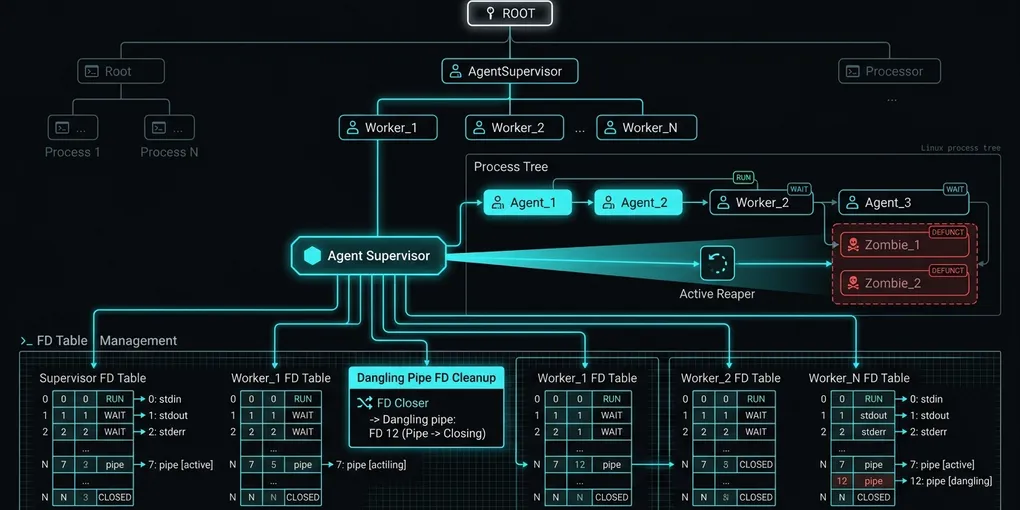
How to Fix Subprocess Zombie Leaks and File Descriptor Exhaustion in AI Agents on Linux
Long-running autonomous coding agents run hundreds of terminal commands per hour. When agents spawn shell tools without proper process reaping, orphaned grandchild processes turn into <defunct> zombies. Eventually, the Linux system hits the PID limit or exhausts available file descriptors on unclosed IPC pipes, triggering BlockingIOError: [Errno 11] Resource temporarily unavailable and OSError: [Errno 24] Too many open files.
That stalls the pipeline. Execution halts immediately.
Here is how to configure a Linux child subreaper in Python, drain pipes without leaking file descriptors, and inspect process leaks in production containers.
1. Quick Fix: The Python Linux Subreaper Pattern
Mark your agent supervisor process as a child subreaper using prctl so that orphaned background processes re-parent to the agent rather than getting lost:
# Save as agent_subreaper.py
import ctypes
import os
import signal
import sys

PR_SET_CHILD_SUBREAPER = 36

def enable_subreaper():
    # Declares the current process as an explicit subreaper for orphaned children
    if sys.platform != "linux":
        return
    libc = ctypes.CDLL("libc.so.6")
    res = libc.prctl(PR_SET_CHILD_SUBREAPER, 1, 0, 0, 0)
    if res != 0:
        raise OSError("Failed to set PR_SET_CHILD_SUBREAPER")

def reap_zombie_children(signum, frame):
    # Reaps all exited background child processes without blocking
    while True:
        try:
            pid, status = os.waitpid(-1, os.WNOHANG)
            if pid <= 0:
                break
        except ChildProcessError:
            break

# Register signal handler and enable subreaper
enable_subreaper()
signal.signal(signal.SIGCHLD, reap_zombie_children)
By setting PR_SET_CHILD_SUBREAPER, any intermediate child shell (such as a timed-out bash tool or subagent worker) that exits before its own children will pass those orphaned processes to your agent supervisor. The non-blocking SIGCHLD handler calls waitpid(-1, os.WNOHANG) to reap their exit codes instantly.
2. Root Cause Analysis: How Agents Leak PIDs and Pipes
AI agent loops fail through two distinct Linux kernel mechanisms:
| Leak Type | Root Cause | Trigger Event | Linux Kernel Error | Mitigation |
|---|---|---|---|---|
Zombie <defunct> |
Parent exits without waiting for child exit status | Tool timeout kills intermediate bash wrapper, leaving grandchild process | Errno 11 EAGAIN (PID exhaustion) |
PR_SET_CHILD_SUBREAPER + waitpid(WNOHANG) |
| Dangling Pipe FDs | subprocess.PIPE stdout/stderr buffers not explicitly closed |
Process terminates abnormally or read stream hangs on unread buffer | Errno 24 EMFILE (Too many open files) |
close_fds=True + explicit pipe context manager |
| Docker PID 1 Failure | Python runs as container PID 1 without init reaper | Docker default stops PID 1 from inheriting standard init signals | Process tree freezes on container restart | Use tini or docker run --init |
| IPC Buffer Deadlock | Command output exceeds 64KB Linux pipe buffer | Child blocks waiting for parent to read; parent blocks waiting for exit | Agent hanging at 100% timeout rate | communicate() or streaming async readers |
3. Safe Subprocess Execution with File Descriptor Cleanup
Never use raw subprocess.Popen without ensuring stdout and stderr pipes close under every exception path. Use this hardened execution wrapper:
import asyncio
import os
import signal
import subprocess

async def execute_agent_command(command: str, timeout_seconds: int = 60) -> tuple[int, str, str]:
    # Executes a terminal command with guaranteed pipe cleanup and process group termination
    proc = await asyncio.create_subprocess_shell(
        command,
        stdout=asyncio.subprocess.PIPE,
        stderr=asyncio.subprocess.PIPE,
        preexec_fn=os.setsid,  # Create independent process group
        close_fds=True,
    )

    try:
        stdout_bytes, stderr_bytes = await asyncio.wait_for(
            proc.communicate(),
            timeout=timeout_seconds,
        )
        return (
            proc.returncode,
            stdout_bytes.decode("utf-8", errors="replace"),
            stderr_bytes.decode("utf-8", errors="replace"),
        )
    except asyncio.TimeoutError:
        # Kill the entire process group, not just the parent shell
        try:
            os.killpg(os.getpgid(proc.pid), signal.SIGKILL)
        except ProcessLookupError:
            pass
        # Wait for termination to clean up file descriptors
        await proc.wait()
        raise TimeoutError(f"Command timed out after {timeout_seconds}s: {command}")
Setting preexec_fn=os.setsid attaches all child processes spawned by the shell to a unique process group ID. When a timeout occurs, os.killpg(os.getpgid(proc.pid), signal.SIGKILL) kills all grandchildren simultaneously, preventing orphaned background commands from lingering.
4. Docker Container Configuration: Avoiding the PID 1 Trap
If you package your agent inside Docker, Python running as PID 1 will not reap orphaned processes by default.
Always run containers with the --init flag or incorporate tini:
# Hardened Agent Dockerfile
FROM python:3.12-slim-bookworm

# Install tini as init system
RUN apt-get update && apt-get install -y --no-install-recommends tini git \
    && rm -rf /var/lib/apt/lists/*

WORKDIR /app
COPY requirements.txt .
RUN pip install --no-cache-dir -r requirements.txt

COPY . .

# Use tini as the entrypoint to handle PID 1 signal forwarding and child reaping
ENTRYPOINT ["/usr/bin/tini", "--"]
CMD ["python3", "main.py"]
In docker-compose.yml, specify init: true:
services:
  agent-runner:
    build: .
    init: true
    ulimits:
      nofile:
        soft: 65535
        hard: 65535
      nproc: 4096
    restart: on-failure
5. Live Auditing: Inspecting Zombie Processes and File Descriptors
Verify whether your running agent process is leaking resources using standard Linux diagnostic tools:
# 1. Check for zombie defunct processes
ps aux | grep "[d]efunct"

# 2. Count open file descriptors for the agent PID
AGENT_PID=$(pgrep -f "main.py")
ls -l /proc/$AGENT_PID/fd | wc -l

# 3. Inspect open pipes and network sockets
lsof -p $AGENT_PID | grep -E "FIFO|PIPE|sock"

# 4. Check system-wide file handle allocation
cat /proc/sys/fs/file-nr
A stable agent maintaining 10 concurrent tasks should hold between 25 and 45 open file descriptors. If ls -l /proc/$AGENT_PID/fd | wc -l continuously climbs after each completed turn, inspect your tool handlers for unclosed streaming pipes or unawaited subprocesses.
Official Documentation & Primary References
- Model Context Protocol (MCP) Official Specification: Protocol transport standards, stdio lifecycle management, and timeout handling.
- FastMCP GitHub Repository: Python server implementation, async event loop integration, and tool execution internals.
- Python asyncio Official Documentation: Event loop scheduling, subprocess management, and coroutine cancellation semantics.
- LangGraph Official Documentation: State graph execution, recursion limits, and conditional edge routing.