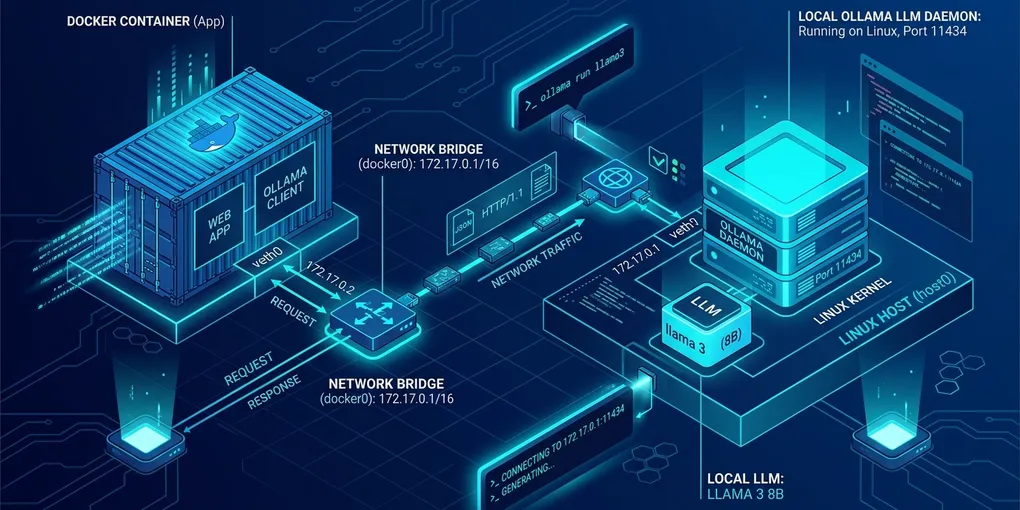
How to Fix Ollama Connection Refused from Docker on Linux
The Direct Solution: Bind OLLAMA_HOST to 0.0.0.0 and Add host-gateway
To resolve ConnectionRefusedError: [Errno 111] Connection refused when calling Ollama from a Docker container on Linux, execute two steps. First, rebind Ollama to listen on all network interfaces by adding Environment="OLLAMA_HOST=0.0.0.0:11434" to the systemd service. Second, pass --add-host=host.docker.internal:host-gateway to your Docker run command and target http://host.docker.internal:11434 instead of localhost.
Here are the exact terminal commands to configure the host systemd daemon:
# 1. Open the systemd override configuration for Ollama
sudo systemctl edit ollama.service

# 2. Paste the following block into the editor, then save and exit:
[Service]
Environment="OLLAMA_HOST=0.0.0.0:11434"

# 3. Reload systemd and restart the Ollama service
sudo systemctl daemon-reload
sudo systemctl restart ollama

# 4. Confirm Ollama is listening on 0.0.0.0 rather than 127.0.0.1
ss -tulpn | grep 11434
# Expected output: tcp LISTEN 0 4096 0.0.0.0:11434 0.0.0.0:*
Launch your container with the host bridge mapping:
docker run -it --rm \
  --add-host=host.docker.internal:host-gateway \
  -e OLLAMA_BASE_URL="http://host.docker.internal:11434" \
  python:3.12-slim \
  python3 -c "import urllib.request; print(urllib.request.urlopen('http://host.docker.internal:11434/api/tags').read().decode())"
Why 127.0.0.1 Fails Inside Docker on Linux
Linux network namespaces isolate container loopback interfaces from the host operating system. On an Ubuntu 24.04 LTS host running Docker 27.2 and Ollama 0.5.4, container connections fail for two distinct architectural reasons:
- Localhost Isolation: Inside a Docker bridge network,
127.0.0.1points to the container’s private virtual network interface (eth0), not the physical host running the Ollama binary. - Default Localhost Socket Binding: As noted in the official Ollama FAQ, Ollama binds exclusively to
127.0.0.1:11434by default. Even if a container successfully routes packets to the host Docker bridge IP (172.17.0.1), the Ollama daemon rejects incoming TCP packets because they originate outside the host loopback adapter.
The table below contrasts container networking modes and their connectivity behavior against Ollama:
| Docker Network Configuration | Host Address to Query | Security Profile | Linux Performance |
|---|---|---|---|
Bridge with host-gateway |
http://host.docker.internal:11434 |
High (Isolated container network) | Native TCP speed |
Host Mode (--net=host) |
http://127.0.0.1:11434 |
Low (Shared host port namespace) | Maximum (Zero bridge overhead) |
Bridge with default 127.0.0.1 |
http://127.0.0.1:11434 |
Broken (Connection refused) | Fails immediately |
Docker Compose with extra_hosts |
http://host.docker.internal:11434 |
High (Declarative service isolation) | Native TCP speed |
Docker Compose Production Configuration
If you run multi-container setups such as Open WebUI, Dify, or custom autonomous agent fleets using Docker Compose, declare extra_hosts under each service needing Ollama access.
Here is the production docker-compose.yml pattern:
version: "3.8"

services:
  ai-agent:
    image: my-coding-agent:latest
    container_name: coding-agent
    environment:
      - OLLAMA_HOST=http://host.docker.internal:11434
      - MODEL_NAME=deepseek-r1:14b
    extra_hosts:
      - "host.docker.internal:host-gateway"
    restart: unless-stopped

  open-webui:
    image: ghcr.io/open-webui/open-webui:main
    container_name: open-webui
    ports:
      - "3000:8080"
    environment:
      - OLLAMA_BASE_URL=http://host.docker.internal:11434
    extra_hosts:
      - "host.docker.internal:host-gateway"
    restart: unless-stopped
Configuring Linux UFW Firewall Rules for Container Traffic
Binding Ollama to 0.0.0.0 exposes port 11434 to your local area network (LAN). That is a huge security hole on shared office networks, because Ollama has zero built-in API key authentication. Any device on your Wi-Fi can hit :11434/api/generate or delete your local model weights via :11434/api/delete.
If your Linux machine runs Uncomplicated Firewall (ufw), block external LAN traffic while explicitly permitting requests from Docker’s virtual bridge subnets (172.17.0.0/16 for default docker0 and 172.18.0.0/16 for Docker Compose networks):
# Verify current UFW status
sudo ufw status verbose

# Allow traffic originating specifically from Docker bridge subnets
sudo ufw allow from 172.17.0.0/16 to any port 11434 proto tcp comment "Allow default docker0 bridge to Ollama"
sudo ufw allow from 172.18.0.0/16 to any port 11434 proto tcp comment "Allow Docker Compose bridges to Ollama"

# Block unauthorized external LAN connections to Ollama
sudo ufw deny 11434/tcp comment "Block public LAN access to Ollama API"

# Reload firewall rules
sudo ufw reload
Field Notes: When host.docker.internal Still Times Out on Ubuntu
Even after setting OLLAMA_HOST=0.0.0.0:11434 and adding host-gateway, containers can still hang for 30 seconds and throw ReadTimeoutError on Ubuntu 24.04 LTS. Two non-obvious traps cause this:
- Custom Docker Compose Subnets Falling Outside
172.17.0.0/16: Every time you rundocker compose up, Docker creates a new project bridge network (br-xxxx) incremented across172.18.0.0/16,172.19.0.0/16, or192.168.x.0/24. If yourufwrule only whitelists172.17.0.0/16, packets from Compose containers get silently dropped byiptables. Runip -4 addr show scope global | grep br-on the host to inspect the exact subnet assigned to your Compose stack, or allow the full RFC 1918172.16.0.0/12Docker pool (sudo ufw allow from 172.16.0.0/12 to any port 11434 proto tcp). - Systemd Override File Placed in the Wrong Path: Never edit
/etc/systemd/system/ollama.servicedirectly. Package updates overwrite that file and silently revertOLLAMA_HOSTback to127.0.0.1. Always usesudo systemctl edit ollama.service, which writes a persistent drop-in file at/etc/systemd/system/ollama.service.d/override.conf. If your container suddenly loses connectivity after anapt upgrade, checksystemctl cat ollama.servicefirst.
Test connectivity from outside the machine with curl -s --max-time 3 http://<LAN_IP>:11434/api/tags to confirm external requests are dropped, while your local coding agents and containers communicate freely with your local models.